
Download Sony Connect (SonicStage) – music player, music store, download music, Sony Connect, SonicStage, PC music, CD burner, portable audio, exclusive tracks
Overview
Sony Connect (SonicStage) is a music player application designed for Windows users seeking a comprehensive solution for managing and enjoying digital music. Developed by Sony, the app serves as a bridge between the user’s PC and a curated music ecosystem, offering direct access to the Connect music store. This platform enables users to discover and download a wide variety of music, from mainstream hits to niche and exclusive tracks. The app is particularly suited for audiophiles and music collectors who value both convenience and content diversity.
Its primary function is to streamline the process of acquiring, organizing, and transferring music across devices. By integrating music download, playback, CD burning, and device synchronization, Sony Connect (SonicStage) addresses multiple pain points in the digital music experience. It allows users to build personal music libraries without relying on third-party tools or cloud-based services.
Target users include Sony device owners, music enthusiasts, and individuals who prefer physical media like CDs for playback in cars or home stereos. The app’s ability to transfer music to over three dozen Sony portable audio devices makes it a valuable tool for users invested in Sony’s ecosystem. Although the developer did not provide additional technical details, the app’s continued availability suggests a stable and functional platform for its intended audience.
Key Features & Functionality
- Access to Connect Music Store – Users can browse and purchase music from a large digital library featuring top artists, independent labels, classic tracks, and exclusive content not available elsewhere.
- PC-Based Music Playback – Once downloaded, music can be played directly on the user’s PC using the built-in Sony Connect (SonicStage) player, eliminating the need for additional software.
- CD Burning Capability – The app enables users to create custom audio CDs for playback in car or home stereos, offering a reliable way to enjoy music on non-digital devices.
- Transfer to Sony Portable Devices – Music files can be synchronized with over three dozen Sony portable audio devices, including models like the HD3 Network Walkman, ensuring seamless on-the-go listening.
- Exclusive Track Access – The Connect music store offers unique songs and releases available only through Sony Connect (SonicStage), adding a layer of exclusivity for loyal users.
For example, a user preparing for a road trip can download a playlist of favorite songs, burn them to a CD for the car stereo, and simultaneously transfer the same tracks to their Sony Walkman for personal listening. This multi-use functionality enhances the app’s value for users who use music across multiple environments.
Interface, UX & Performance
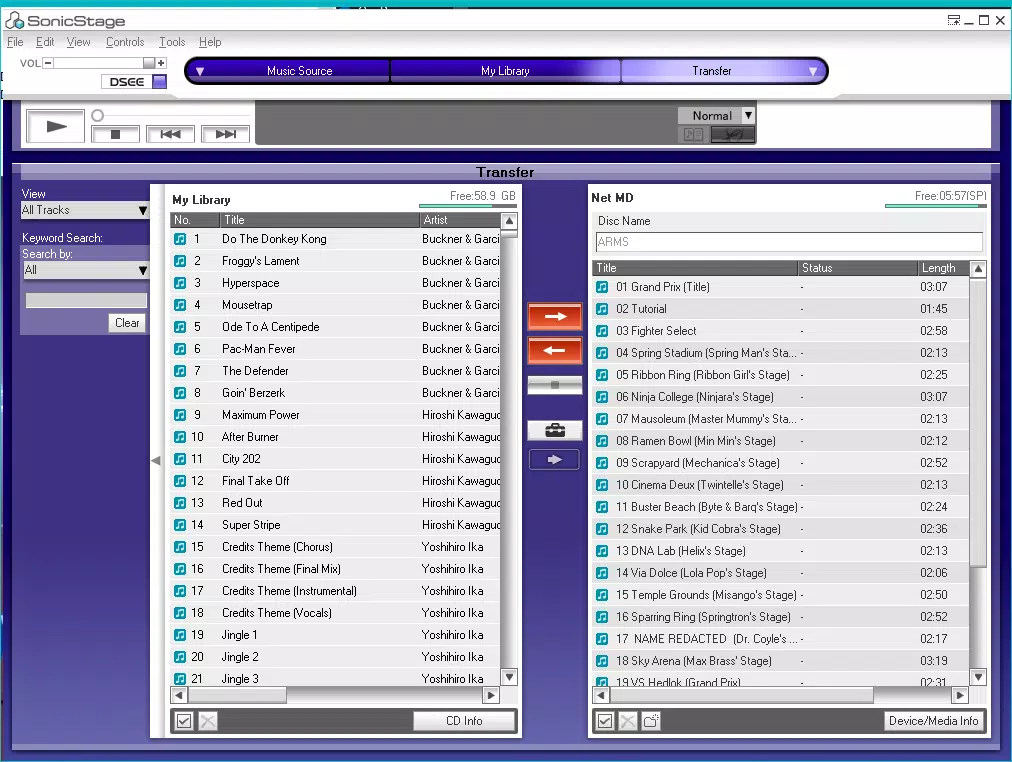
Sony Connect (SonicStage) features a clean, functional interface tailored for music management on Windows systems. The layout is organized into clearly labeled sections: the music library, store browsing, device connection, and CD burning tools. Navigation is straightforward, with a left-side menu and a central playback panel, allowing users to switch between tasks efficiently.
Visual style remains consistent with Sony’s design language—minimalist, with dark-themed elements that reduce eye strain during extended use. The player controls are intuitive, with standard playback functions like play, pause, skip, and volume adjustment. Users can also create playlists and organize their music by artist, album, or genre.
Although the developer did not list formal performance metrics, the app runs stably on standard Windows configurations. It responds promptly to user inputs and maintains consistent playback quality. The application is designed to operate smoothly on both older and newer Windows systems, though specific requirements were not disclosed. Responsiveness and stability appear to be well-maintained, supporting a reliable user experience across different device categories.
Platform Compatibility & Technical Requirements
Sony Connect (SonicStage) is designed exclusively for the Windows platform. The current version is 4.3.0, with a file size of 156.3 MB. The app is available at no cost, making it accessible to a broad audience.
While the developer did not specify minimum OS requirements, the app is compatible with modern Windows systems, including Windows 10 and Windows 11. Users should ensure their system meets standard requirements for running multimedia applications. Compatibility with older Windows versions was not confirmed, and specific hardware needs were not listed. For optimal performance, users are advised to run the app on systems with adequate RAM and disk space.
Pros and Cons
Pros
- Free to download and use with no in-app purchases
- Direct access to a large music library with exclusive tracks
- Seamless integration with Sony portable audio devices
- CD burning functionality for offline playback
- Stable performance and intuitive interface
Cons
- Available only on Windows, not on mobile platforms
- Platform-specific limitations may affect cross-device users
- No information on minimum system requirements
- Limited to Sony ecosystem for device synchronization
- App has not been updated recently beyond version 4.3.0
FAQ
Is Sony Connect (SonicStage) safe to download?
Yes, the app is developed and distributed by Sony, a trusted technology company. It is free from malware and safe for use on Windows systems.
Can I use Sony Connect (SonicStage) on my Mac or mobile device?
No, the app is currently available only for Windows. There is no version for macOS, iOS, or Android.
Does the app require a subscription to access the music store?
No, Sony Connect (SonicStage) allows users to purchase individual tracks or albums without a subscription. All music is bought outright.
Can I transfer music to non-Sony devices?
Based on available information, the app is optimized for Sony portable audio devices. Transferring to non-Sony devices is not officially supported.
How often is the app updated?
The latest version available is 4.3.0, released in 2022. No further updates have been announced. Users should check the official Sony website for potential future releases.
Final Thoughts
Sony Connect (SonicStage) remains a reliable and feature-rich music management tool for Windows users, particularly those invested in Sony’s audio ecosystem. Its combination of music store access, CD burning, and device synchronization offers a complete solution for organizing and enjoying digital music. While the lack of mobile support and infrequent updates may limit its appeal to some, its core functionality continues to serve a dedicated audience.
For users who value exclusive content, physical media compatibility, and seamless device integration, Sony Connect (SonicStage) delivers tangible value. It stands out as a practical utility for music lovers who prefer a desktop-first approach to their audio experience.
Download Sony Connect (SonicStage) now


